Temple Run : Oz v1.0.1 Apk[Mediafire Link]


SUPPORTED DEVICE :

Android 2.2 and up

GOOGLE PLAY DESCRIPTION :

Disney and Imangi Studios present Temple Run: Oz – a brand-new endless runner inspired by Temple Run 2 and the film Oz the Great and Powerful. Play as Oz and outrun the shrieking flying baboons as you turn, jump and slide your way across the land. Begin your exhilarating adventure now and see how far you can run!

INSTALLING INSTRUCTIONS :

  • Download Temple_Run_droidtricks.apk from below(MF password : droidtricksqvga.blogspot.in)
  • Install Temple_Run_droidtricks.apk and enjoy

Download(Apk)

SCREENSHOT :


Google Chrome Browser[APK] for low end Android


SUPPORTED DEVICE :

Galaxy Y, Micromax A25/A44/A452 or any qvga/hvga android device

DESCRIPTION :

Browse fast with the Chrome web browser on your Android phone and tablet. Sign in to sync your Chrome browser experience from your computer to bring it with you anywhere you go.

Search fast
- Search and navigate fast, directly from the same box. Choose from results that appear as you type.
- Browse faster with accelerated page loading, scrolling and zooming.

Simple, intuitive experience
- Open and quickly switch between an unlimited number of tabs. On your phone, flip through tabs the way you would fan a deck of cards. On your tablet, swipe from edge to edge to switch tabs.

Sign in
- Sign in to Chrome to sync your open tabs, bookmarks, and omnibox data from your computer to your phone or tablet. Pick up right where you left off.
- Send pages from Chrome on your computer to Chrome on your phone or tablet with one click and read them on the go, even when you’re offline.


INSTALLING INSTRUCTIONS :

  • Download Google_Chrome-droidtricks.apk from below
  • Now install it and enjoy
Download(Apk)

SCREENSHOTS :


WhatsApp Messenger v2.8 For QVGA low end Android


SUPPORTED DEVICE :

Galaxy Y, Micromax A25/A44/A452 or any qvga/hvga android device with Armv6/Armv7

DESCRIPTION :

WhatsApp Messenger is a smartphone messenger available for Android and other smartphones. WhatsApp uses your 3G or WiFi (when available) to message with friends and family. Switch from SMS to WhatsApp to send and receive messages, pictures, audio notes, and video messages.

INSTALLING INSTRUCTIONS :

  • Download WhatsApp Messenger v2.8.4776-droidtricks.apk from below.
  • Now install Apk file in your device and enjoy

Xperia Arc Widgets Pack For Android Device


SUPPORTED DEVICE : QVGA/HVGA/WVGA

ARC WIDGETS :
  • Toggle Widget
  • Status Switch
  • Photo Widget
  • New Digital Clock Widget
  • Media Widget
  • Digital Clock Widget
INSTALLING INSTRUCTIONS :
  • Extract Arc_Widgets-droidtricks.zip and paste each files to SD card
  • Now Install one by one


Xperia Arc Launcher For QVGA Android[APK]


 SUPPORTED DEVICE : Galaxy Y, Micromax a25,a44,a52, Lg optimus l3 or any qvga android

DESCRIPTION :
  • 4-Desktop corners
  • Folders exactly looks like xperia
  • 5-Home screen and many more.
(apk)
SCREENSHOTS :


Link2SD Apk | Move apps to SD card


REQUIREMENTS : 

Rooted Android 1.6+

DESCRIPTION :

Link2SD is an application that makes it easy for Android 1.6+ users with root privileges on their phone to move applications to the SD card. 4. Back up all your data from SD card and internal memory because

FEATURES :

  • Create and remove link for apk, dex and lib files of the applications you select
  • Automatically link newly installed apps
  • Move any user apps to SD even though the app does not support moving to SD (for Android 2.2 and higher)
  • Set the default install location of the apps; auto, internal, or external (for Android 2.2 and higher)
  • Batch link, unlink, reinstall, uninstall, "move to SD", "move to phone" functions (multi-select mode)
  • Uninstall system applications
  • Freeze and un-freeze system and users applications
  • Convert system apps into user apps
  • Convert user apps into system apps
  • Integrate "Updated" system apps into system (ROM)
  • Clear data and cache of the application
  • Clear all apps cache at once (1-tap cache cleaner without being root)
  • List applications, show detailed size information and link status
  • Sort and filter applications
  • Search applications by name
  • Display available space information of internal storage, SD card and SD card 2nd partition

HOW TO INSTALL :

1. Download Link2D from from below and install it.

3. Download Partition manager from below and install it.

4.Back up all your data from SD card and internal memory because partion will wipe all your data

5. Open Mini Tool (partition manager's name) in your computer. Locate your SD card

6. Right click and choose Delete.

7. Now again right click and create FAT PRIMARY PARTION(But not fat32) and choose smallest size.

8. Then create a EXT2 PRIMARY partition of 1 GB (not bigger) which will be used with Link2SD.

9. Create a FAT32 partition for the remaining space left on the SD card, by the same way you created EXT2.

10. Now Click the Apply button on the top left corner and wait for it to finish the process.

11. Put back your SD-CARD

12. Now Open Link2sd. You will be prompted to choose ext2, ext3, ext4 and FAT32.Select ext2

13. Reboot your phone now.

15. Go to Link2sd>Settings>check the autolink (to automatically move apps upon installation).
16. Enjoy!
(Link2SD)
(Partion Manager)

[Stable]Root Explorer(2.16) Apk For Android Devi


Supported Device : QVGA/HVGA/WVGA

DESCRIPTION :
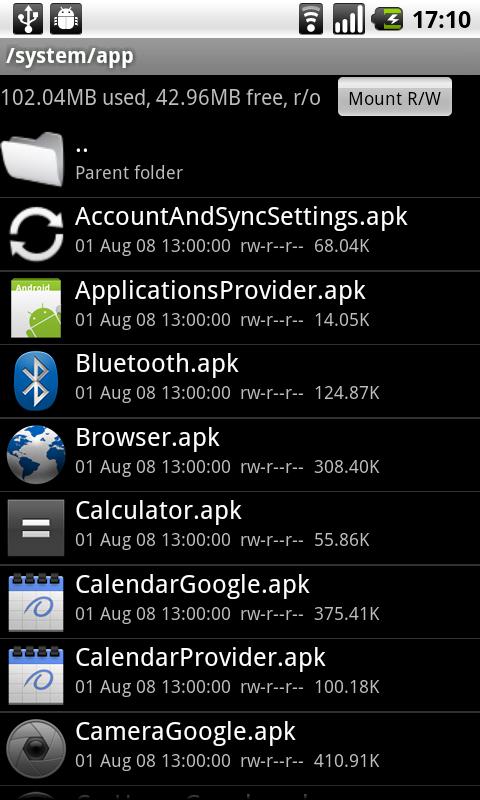
Root Explorer is the ultimate file manager for root users. Access the whole of android's file system (including the elusive data folder!).

Features include SQLite database viewer, Text Editor, create and extract zip or tar/gzip files, extract rar archives, multi-select, execute scripts, search, remount, permissions, bookmarks, send files (via email, bluetooth etc), image thumbnails, APK binary XML viewer, change file owner/group, create symbolic link, "Open With" facility, MD5, create shortcuts.

Screenshots :


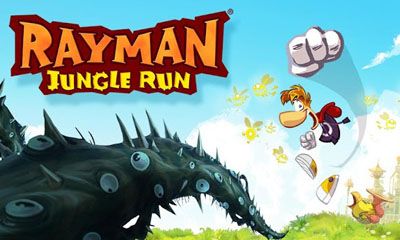
RAYMAN JUNGLE RUN FOR QVGA/HVGA/WVGA

SUPPORTED ANDROID VERSION : 

Android 2.3+(Armv7)

SUPPORTED DEVICE : 

QVGA/HVGA/WVGA

DESCRIPTION :

The legendary platforming hero is making a jump to your favourite iOS device! Rayman Jungle Run is powered by UbiArt Framework engine brought to you by Rayman Origins. Rayman Jungle Run is easy for all ages, but will challenge old fans and masters of Rayman. Unlock the Land of Livid Dead levels if you have the skills!

INSTALLING INSTRUCTIONS :

  • Download APK+DATA of Rayman Jungle run v2.0.1 from below
  • Copy com.pastagames.ro1mobile and paste it into Android>>data>>here
  • Now install Rayman jungle Run apk
SIZE=85.5mb

SCREENSHOTS :


HOLO LAUNCHER + GALAXY S3 THEME FOR QVGA ANDROID


2013.01.17-13.04.20

Supported Device :

Any Android Device

Basic Features:

- Full ICS Style: ICS Icons, Folders, Outlines, Drawer Tabs, etc.
- Custom Desktop Pages/Grid: Up to 9 desktop pages and 10 x 10 grid.
- Custom Drawer Portrait/landscape Grid
- Scrollable Dock: Up to 7 icons per page and up to 3 pages.
- Infinite Scrolling
- Gestures: Swipe up/down on desktop to launch apps quickly.
- Customizable shortcut/folder icons
- Customizable icon label color
- Apply icon packs, support ADW icon pack and Launcherpro icon pack.
- Desktop Previews: Pinch to access desktop previews.
- Backup and Restore: Backup and restore your settings and shortcuts.
- Other Customization Options: Keep in memory, home key action, hide apps in drawer, hide labels, etc.

INSTALLING INSTRUCTIONS:

  • Install Galaxy S3 theme apk file
  • Now install holo launcher and go to laucher  setting>>appearance setting>>select icon pack
DOWNLOAD(Holo Launcher)
DOWNLOAD(Galaxy S3 theme)
2013.01.17-13.04.202013.02.22-15.21.52

CHAIN FIRE 3D FOR MICROMAX A25/A44/A52

SUPPORTED DEVICE : 

 QVGA, HVGA, WVGA

GOOGLE PLAY DESCRIPTION :

Take control over your GPU!

Chainfire3D is an intermediary OpenGL driver. What does that mean? It means that Chainfire3D sits between your apps and the graphics drivers, and can intercept and/or change commands between the two. It has some built-in functions, and can be further extended with plugins to provide extra functionality.

!! For Froyo and Gingerbread ONLY. NOT COMPATIBLE with Honeycomb/Ice Cream Sandwich/Jelly Bean !!

!! Chainfire3D is for 1ghz+ devices only !!

!! ROOT is required for this program, as well as a writable /system partition. S-OFF is also required on HTC devices !!

Features include reducing texture size and quality to reduce memory use and potentially increase game performance, as well as increasing memory use potentially increase performance.

If you also install the (experimental) EGL driver, AND your GPU supports it, AND you have the Pro version, you can enable 4xMSAA or 16xMSAA on a per-app bases. This can drastically improve image quality!
source : google play

HOW TO INSTALL :

  • Download chaifire 3d from below and extract chainfire3d Chainfire_3d_by_droidtricks,rar to your sd card.
  • Now install chaifire apk file.
  • And then open chainfire app and install plugins which is included in chainfire3d_by_droidtricks,rar.

SCREENSHOTS :


NFS MOST WANTED FOR ALL ANDROID DEVICES [Links Updated]


SUPPORTED DEVICE : 

QVGA/HVGA/WVGA

INSTALLING INSTRUCTIONS :

  • Donwload(from below) apk and data and exract nfsmw1028.data .
  • Copy data folder and paste in android/data/here
  • Now install nfs mw apk.
DOWNLOAD(DATA)
(4shared lik)